
V3.1.20 adds new tools for type well analysis, prospect risking, and after-tax economics: Probit and Trumpet plots based on SPEE Monograph 5, a new Risk Tree, Income Tax Units, and a streamlined V3Connect. With nearly 800 fixes and improvements, it’s one of our biggest updates yet for reserves engineers and analysts.
V3.1.20 adds dedicated Probit and Trumpet plots built on SPEE Monograph 5. Use Probit plots to test whether your analogs fit a lognormal distribution, and Trumpet plots to see how uncertainty narrows as your drilling program grows, all inside PHDwin.
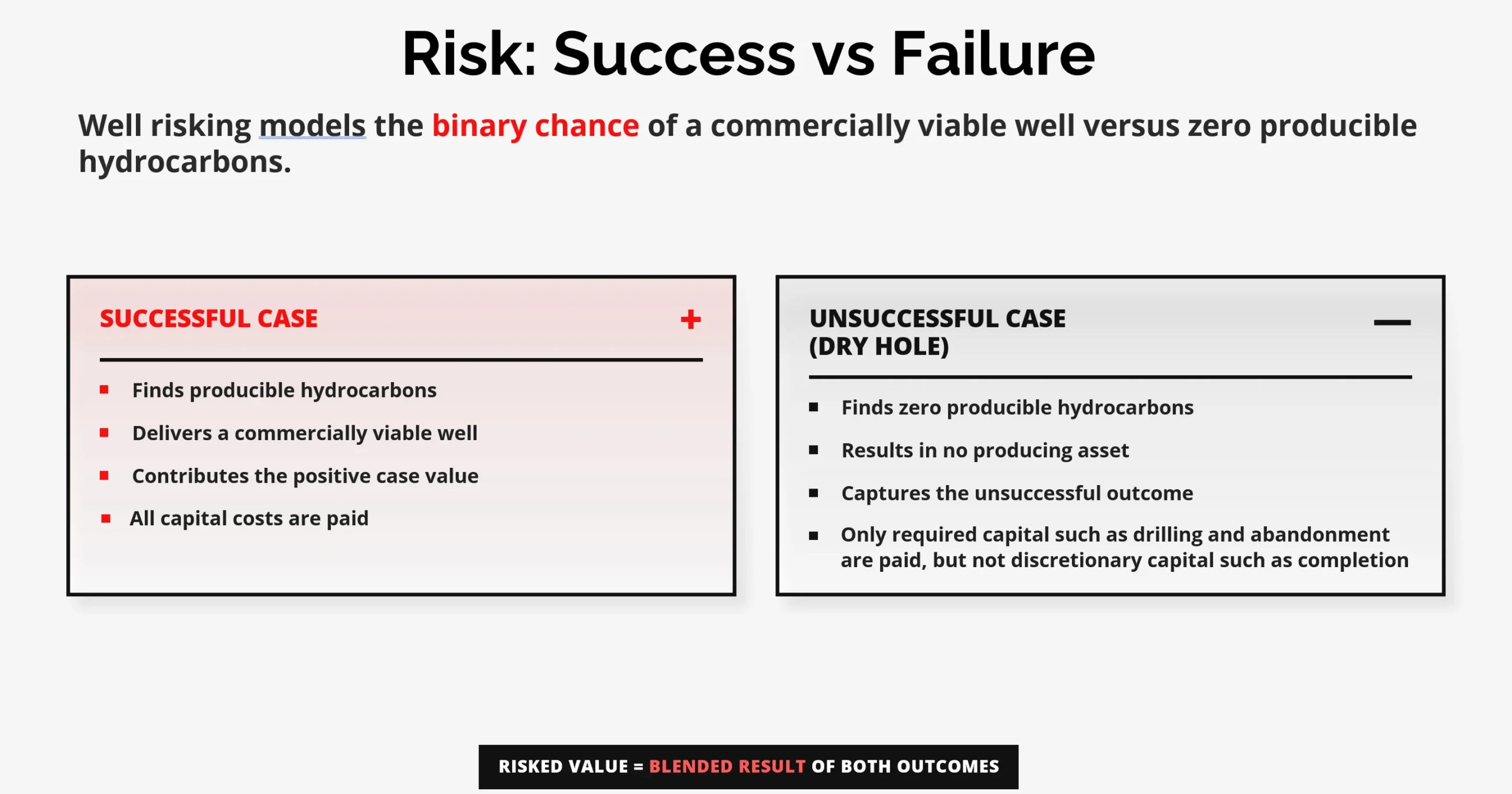
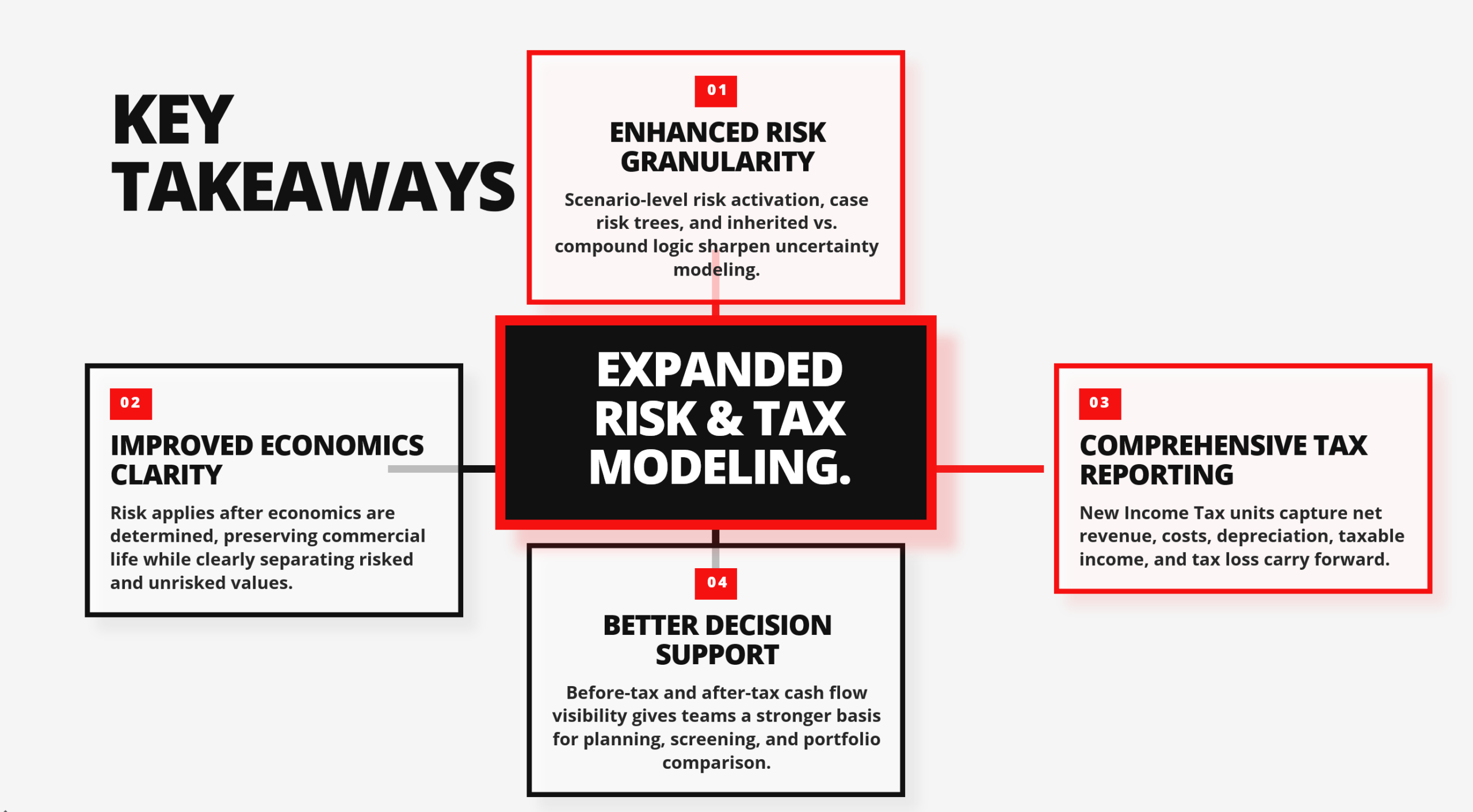
V3.1.20 introduces well risking with the new Risk Tree. Model the chance of a dry hole versus a commercially viable discovery before capital is committed. PHDwin blends the value of the successful case with the unsuccessful, zero-hydrocarbon outcome.
Reports clearly flag risked results. One-line reports show risked cases and summaries in italics, and other reports show risked values in red in the report headers.
Every prospect has two futures. PHDwin V3.1.20 blends the successful case with the dry hole into a single risked value, before any capital is committed.
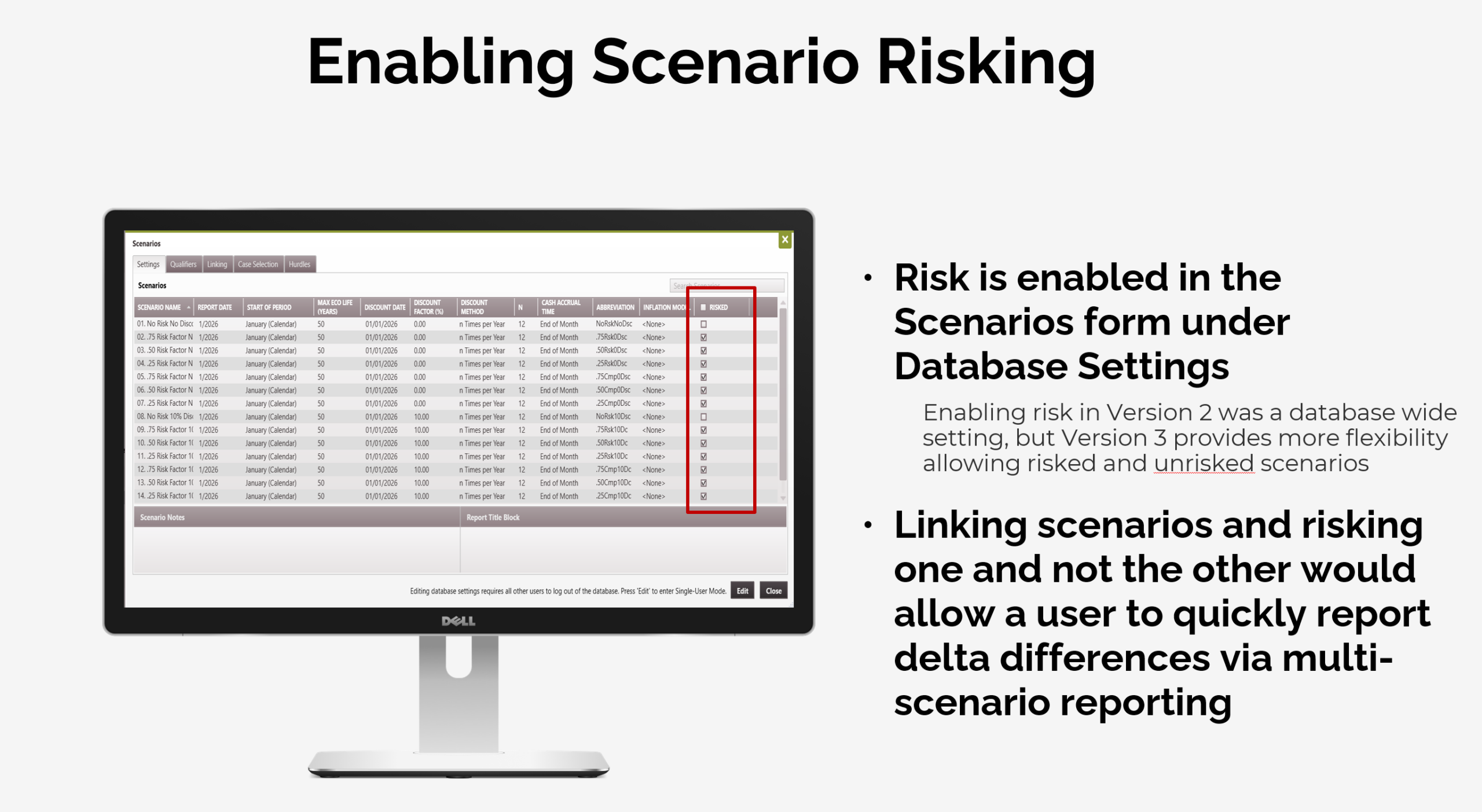
One checkbox per scenario, not one switch for the whole database. Run risked and unrisked versions of the same scenario and report the difference side by side.
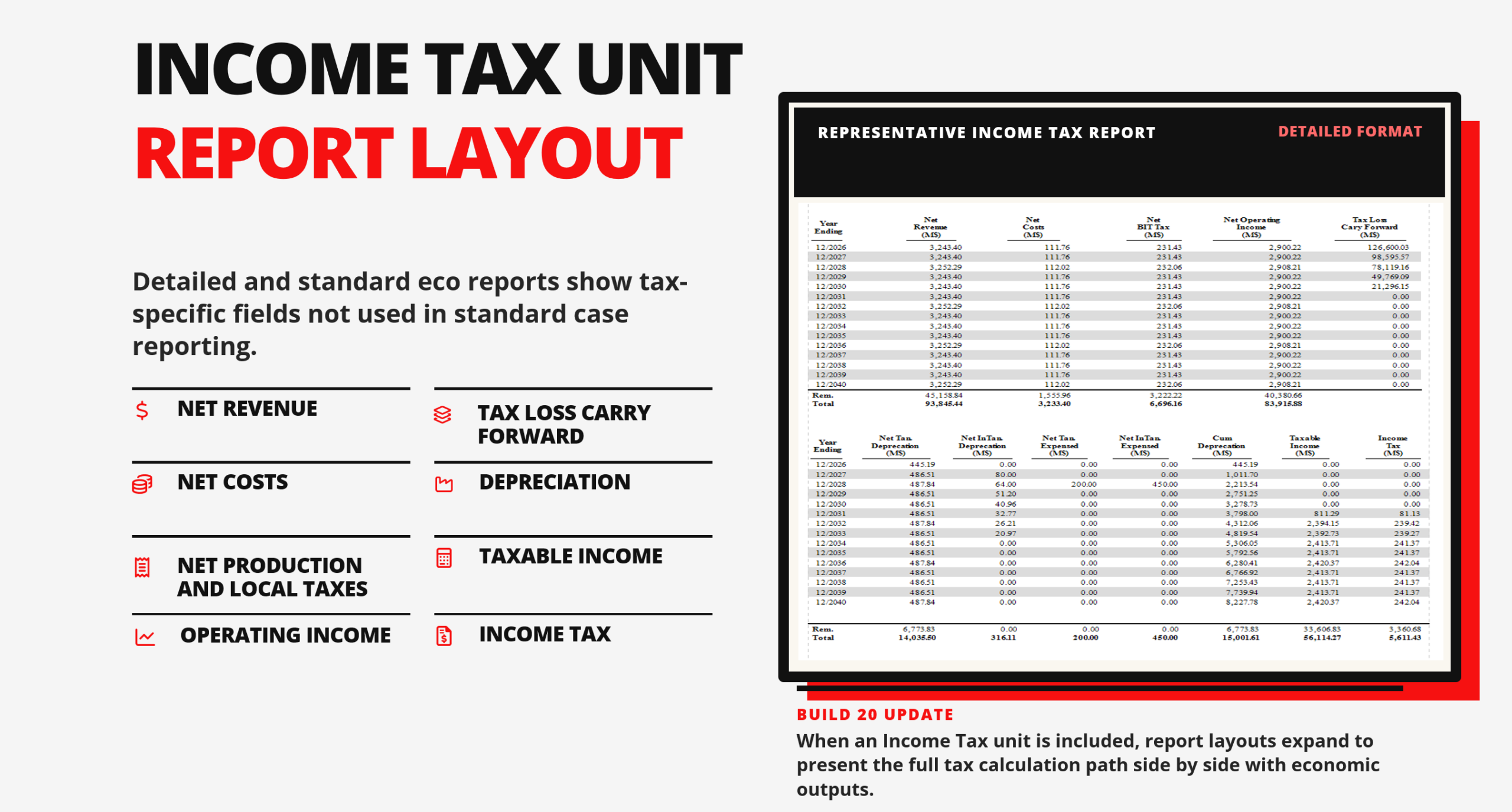
Add an Income Tax Unit to your report and the layout expands automatically. It shows operating income, depreciation, tax loss carry forward, taxable income, and income tax, year by year.
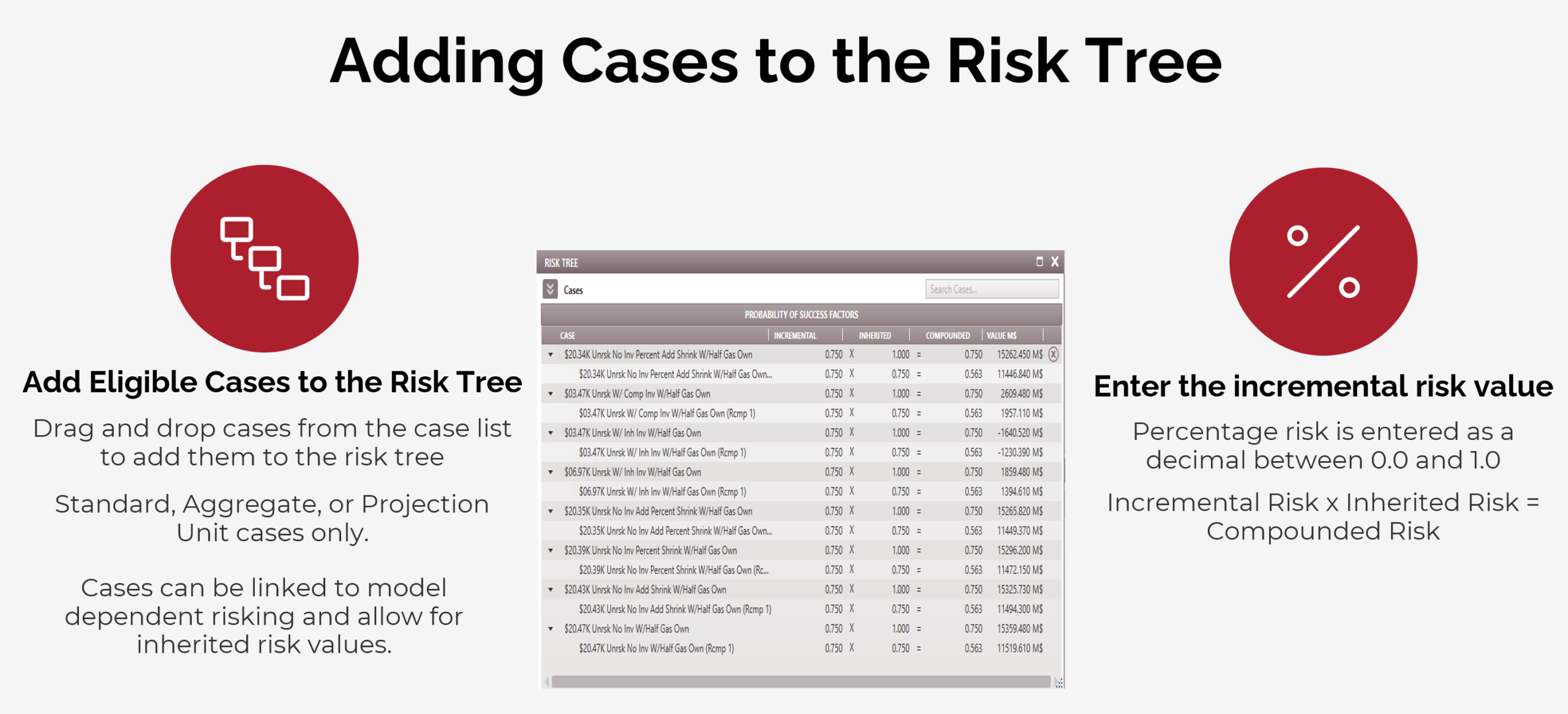
Drag, drop, and enter a decimal. The new Risk Tree compounds chance of success across dependent wells automatically: 0.75 × 0.75 = 0.563.
Risk by scenario. Tax by unit. Both on the same report. Here’s everything new in PHDwin V3.1.20’s risk and tax modeling in one session.
As seen on PHDwin Week 2025 & 2026 | Updated as of September 2026 to work with V3.1.20
A new OUT file format built for visualizations and data warehousing. Send your PHDwin V3 output wherever your team analyzes it.
Excel now connects to V3 automatically. Choose a V3Connect report from the report dropdown, and PHDwin runs the data, opens the sheet, and refreshes it for you.
Note: Previous V3Connect sheets no longer work. Use the new sheets provided with V3.1.20.
The following items need to be installed manually if users install PHDwin from the .msi installer. The .msi installer cannot check for or install these items automatically.
V3.1.20 updates two key dependencies: the ODBC driver is now version 18, and PHDwin now ships with SQL 2025. Existing V3 users will be prompted to install ODBC 18.
Learn more about PHDwin V3 Dependencies here.

Comprehensive release notes for September 2026
ODBC 18 required: Every V3 user will be prompted to install ODBC Driver 18. Setups using the old ODBC driver or SQL Server Native Client are no longer supported.
New V3Connect sheets: Previous V3Connect sheets no longer work. Use the new sheets included with V3.1.20.
License file: This update may require a new license file. Email [email protected] to request one.
We have now introduced dedicated Probit and Trumpet plots. Easily model threshold distributions with Probit analysis, and track uncertainty boundaries against acceptance limits using Trumpet plots.
Well risking models the binary chance of a dry hole versus a commercially viable discovery before capital is committed. It blends the value of the successful case with the unsuccessful outcome that produces zero hydrocarbons. Risk is modeled using the new Risk Tree in PHDwin V3 Build 20 where users can apply numerical risking values to a single case or link cases to create dependencies and adjust subordinate wells by a compounded risking factor. Risk is scenario controlled and each scenario has the option for unique risking values.
Reports have been updated to allow users to quickly identify if a case has been risked or if the summary contains risked cases. One-line reports will have cases and summaries italicized if they contain risked values and other reports will have risked values in the red in the headers of the reports.
Build 20 adds a new Income Tax group case for aggregating data from multiple child cases. It gathers net economic values from the child cases including revenue, costs, production, local taxes, and depreciation into a unit. The unit does not calculate a GEL. Income Tax Units triggers unique report layouts required for reporting income tax related values. such as depreciations, net operating income, tax loss carry forward, taxable income, and charged income tax.
Excel now automatically connects to V3 and outputs the V3Connect report you want straight from the report dropdown, so there's no need to paste connection strings! The V3Connect sheets have also been updated to have a drop down of appropriate prior report runs to compare results, plus a prompt to delete the report run that generated the original output to preserve database space. Note that all previous V3Connect reports no longer work and clients must use the new provided sheets.
For the first time since V3's launch the ODBC dependency has been updated to 18 which has ARM compatibility. Note that every V3 user will be prompted to install the new ODBC driver. Any implementation based on the old ODBC driver or SQL Server Native Client is no longer supported.
V3 now supports compatibility with a new OUT file format that can be used for visualizations and data warehousing. Supported clients can get setup with the output and configure it to push data to Microsoft Access if needed.
To better assist clients in knowing which database they are currently editing, we have added a new icon to the Home ribbon to identify the current database.
The SQL version that is packaged with PHDwin is now SQL 2025.
Related bug fix and improvement: